
Sidebar
panel_conference
Conferencing panel
Conferencing is fantastic for collaborative second reviews and demonstrations to colleagues and students.
With it you can have the full multi-head microscope from anywhere in the world.
Just head to the conference panel at the top of the screen, click the start button, and share the link with your audience.
Check out what it can look like in the video below:
Setting up a conference
You can either head to the conference tab, or open the conference panel.

Conference tab offers different buttons to setup conference. The first button starts the conference, there is pause conference icon, stop conference and toggle everyone in the conference options. There is also a button to join an existing conference.
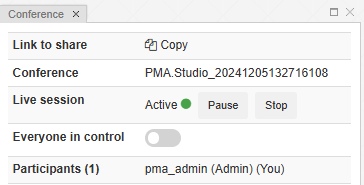
In the conference panel, you will see the menu above
Conferences can be in different states:
- No active conference:
- When there is no active conference this panel shows a placeholder that allows user to Create new conference or Join an existing conference.
- Active conference.
- When you've started a conference you will see:
- Link to share - Clicking the 'Copy' button puts the link for joining the conference on your clipboard ready for you to paste and send to your desired participants
- Conference - The ID of the conference
- Live session - Shows Active (green) or Inactive (red) if you've paused the session. Also buttons to pause/unpause the session, or Stop the session are shown here
- Everyone in control -
- when everyone in control is enabled, all participants can control the slide and make temporary annotations for everyone to see.
- When everyone in control is disabled, only the conference owner can move and annotate the slide
- Participants - list of participant nicknames
P.S The conferencing feature of PIMSLS works in close collaboration with PMA.live. A PMA.live server component must be configured explicitly in the PIMSLS administrative back-end in order for this functionality to work.
panel_conference.txt · Last modified: 2025/05/12 19:09 by ali


