
This is an old revision of the document!
Inviting Users to an Organization
Having an Organization in My Pathomation gives you the possibility to create a collaborative space. To create such space we can invite users into the Organization. The users that you invite will receive an email. Existing users will be invited to login into my Pathomation and join the Organization. Email addresses without a Pathomation account will be invited to create a new Pathomation free account so that they may join your Organization.
To send invites, access the Profile management section by clicking in the icon on the upper right corner. The icon displays the initials of your name.

Then select “Manage Organization”
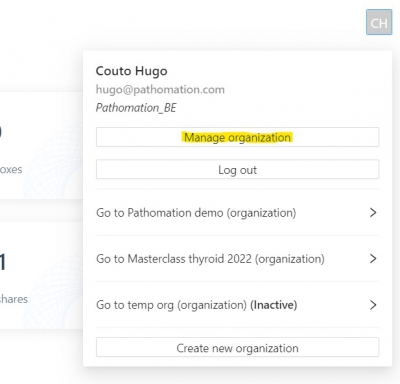
And once in the “Manage Organization” menu, select “send invitations”

In the pop-up window you can add the email of the individuals to be invited and specify their roles:
- Managers have all rights including uploading, sharing and payment plans.
- Editors have all rights related to content creation and user management.
- Members can only see what was assigned to them by Editors or Managers, and have no rights to upload slides or change content.
You can also select sub groups within the organization to add them to as well. You can check the section related to groups to better understand how you can create groups as working teams within your Organization.
