
This is an old revision of the document!
Change the Server of a Training Session
Training Sessions are hosted on one or more servers depending on how many servers you rent from Pathomation around the globe.
The server is the place where you and your participants connect to, stream the digital pathology images from, upload form data to, and more.
The closer the server is to your participants, the shorter the distance the data has to travel, and the better the performance will be.
Especially for data-intensive applications like viewing digital pathology images, this can make a huge difference to performance.
Prior to PathoTrainer version 2.2.0 (released NOV-2025), you had to manually select a single server per Training Session to which your participants will be connecting (see image below).
This sometimes created administrative burdens for Training Sessions with participants joining simultaneously from different geographies and always-available Courses.
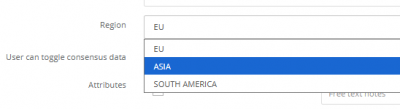
With PathoTrainer 2.2.0, you now have the added option to turn on 'Automatically select best region'.
When activated, the system will attempt to detect and assign the fastest and nearest server to a participant.
You can also still select the region manually if so desired.
Please note: If you only have one server with Pathomation, they will always be assigned to that server - contact info@pathomation.com and pm@pathomation.com to learn more about adding additional servers to boost your performance globally.