• skip to content

PMA.studio 2.1.0

User Tools

  • Log In

Site Tools

  • Recent Changes
  • Media Manager
  • Sitemap
Trace: • ribbon_home_viewport_brightness_contrast • ribbon_config_panels_toggle_search • ribbon_tray_share • ribbon_size_custom • ribbon_config • ribbon_annotations_ellipse • ribbon_config_server_connect • ribbon_annotations_color • ribbon_home_layout_info_annotations • panel_config

Sidebar

About PMA.studio

  • Who should read this
  • Connectivity
  • User interface

getting started

  • Operating modes

Ribbon

  • Context menu
  • Tab inventory
  • Available commands
  • Configuration

Interacting with slides

  • Working with grids
  • Static snapshots
  • Sharing live views
  • Broadcasting and concferencing
  • Searching

Annotations

  • Basic controls
  • Simple shapes
  • Compound shapes and polygons
  • Brush and magic wand
  • Edit annotations
  • Import and export

Panels

  • Slide browser
  • Viewport
  • Info
  • Annotations
  • Forms
  • Tray
  • Color adjustments
  • Conferencing
  • Configuration

Automation

  • Version retrieval
  • Linking and sharing
  • Barcodes

FAQ

Administration

  • Tile servers
  • Panels layout
  • Ribbon layout
  • Global settings
  • Shared links
  • Conference settings
  • Server visits
  • Users
  • Elmah
  • Manual
  • Viewer

Terminology

panel_config
Book Creator
 Add this page to your book
Book Creator
 Remove this page from your book  

 Manage book(0 page(s))
 Help

This is an old revision of the document!


Panel Configuration

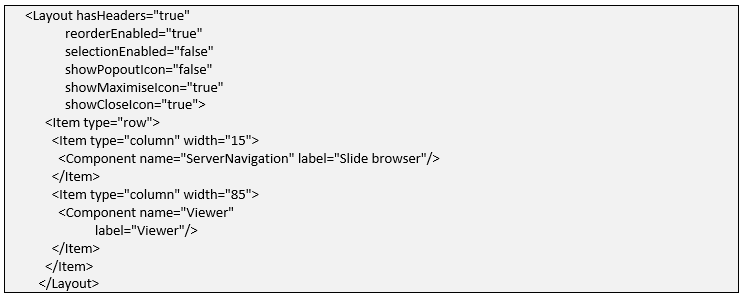
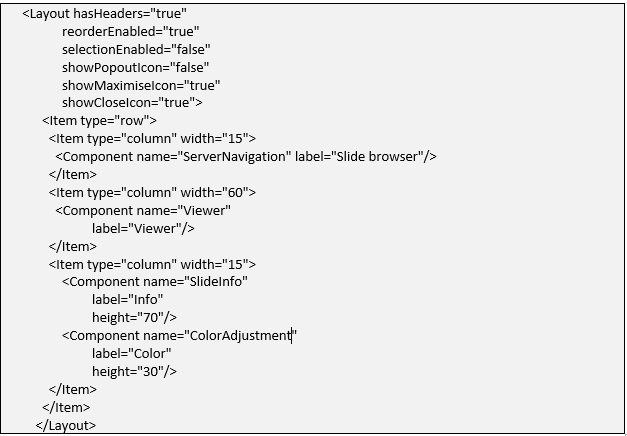
PMA.studio allows configuration of different panels that appear on the UI through the admin section. The admin panel layout page allows to add xml based layout tags which are parsed by the front-end application accordingly. There are different kind of panel layouts including:

Default Layout
Detail Layout
panel_config.1652036939.txt.gz · Last modified: 2022/05/08 22:08 by ali

Page Tools

  • Show pagesource
  • Old revisions
  • Backlinks
  • Add to book
  • Export to PDF
  • Back to top
Donate Powered by PHP Valid HTML5 Valid CSS Driven by DokuWiki