
user_config
This is an old revision of the document!
Table of Contents
Configure user accounts
- The “Last login” column displays each user's last successful login date.
- The “Local” column indicates whether or not a user is managed by PMA.core or LDAP.
- The “Administrator” column indicates whether or not a user can access PMA.core. Non administrator users cannot perform system management tasks within PMA.core.
- The “Can Annotate” column indicates whether or not a user is allowed to create and edit annotations.
- The “Suspended” column indicates whether or not a user is currently allowed to login to either PMA.core or downstream applications. A suspended login is treated as invalid by the system.
- The “Locked out” column indicates whether or not a user is currently locked out due to consecutive invalid log in attempts.
- Clicking on a user's email address launches your default email client.
- Clicking on a user's login name displays a summary of the user's activity.
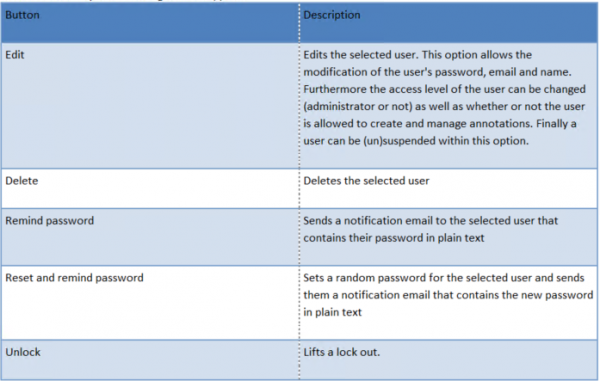
Next to each entry the following buttons appear:
Add new user accounts
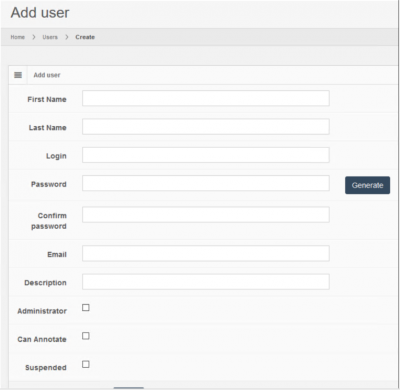
To add a user click on the “Add” button on the top right of the table.

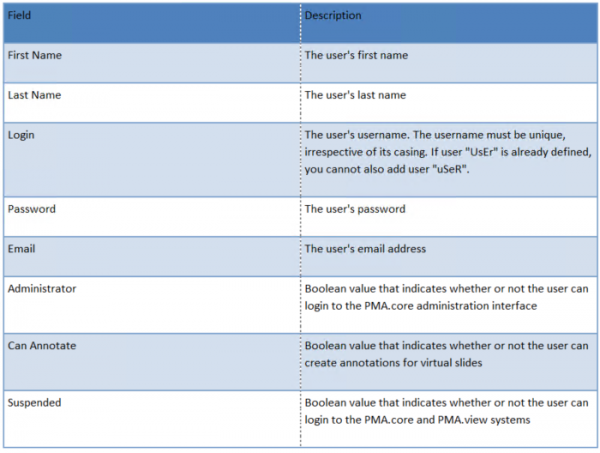
The following fields can be defined for each user:
Modify user accounts
Delete user accounts
Audit trailing
user_config.1646673068.txt.gz · Last modified: by yves